
 Oct 23,2026
 By:
By: Introduction
Start your family game night today! 🎮Picking the best game console for kids sounds easy until you're standing in an electronics aisle on a Saturday, a toddler is pulling on your sleeve, and three boxes are all shouting "family fun" at you. I've been there. Okay, not exactly there, but close enough. My cousin Priya called me last winter in total panic, asking which one to buy for her seven-year-old and her ten-year-old who fight over literally everything. If the price tag scares you, Back Market is a smart place to find refurbished consoles for less.
So here's the thing. There's no single perfect answer. But there is a right answer for your house, and we can get there.
What Makes the Best Game Console for Kids?
Before brand names, think about what you actually need. Four things matter most.- Safety and control: Can you limit screen time? Block chat with strangers? Stop a surprise purchase of 40 dollars of in-game coins? (That last one has happened to more parents than will admit it.)
- Game library: Kids want familiar characters and simple controls. You want games that don't have you squinting at a screen full of blood.
- Local multiplayer: Sitting on the same couch beats playing online with strangers. Every time.
- Cost: The console is only the start. Controllers, games, and online subscriptions add up fast.
Nintendo Switch: The Easiest Pick for Younger Kids
If you want the short answer, it's probably a Nintendo console. The Switch family, including the newer Switch 2, is built around games you can play together without a manual. Mario, Kirby, Zelda, Pokémon, Animal Crossing. Bright, forgiving, and almost never scary.Why it works for families:
- Local play is baked in: The Joy-Con controllers split in half, so two people can play right away with no extra purchase. Wonderful when grandma shows up unannounced.
- It's portable: The handheld mode saves road trips. I mean it. Two hours in the back seat without a single "are we there yet?" is priceless.
- The games age well: A title from a few years ago is still fun and often discounted.
Which model? The standard Switch and the OLED are both solid. The Lite is cheaper, but it can't connect to a TV, which kills family play. Skip the Lite if game night is the goal.
PlayStation: Great Graphics and Growing Kid-Friendly Options
The PlayStation 5 is a powerhouse. Fast loading, gorgeous visuals, and a controller with haptic feedback that feels strange and cool at first (the triggers push back against your fingers, which my nephew called "magic").For kids, the library is smaller than Nintendo's, but there are real gems. Astro Bot is almost universally praised for being joyful and easy to pick up. Sackboy: A Big Adventure supports up to four players. Lego games, Minecraft, and Rocket League also run well here.
Where PlayStation shines is for families with a wide age range. A 12-year-old can play something more mature while the younger sibling does Sackboy, and the console handles both. Its family management tools are strong too, letting you set play time, restrict spending, and limit age ratings from an app or the console menu.
The catch is price. A PS5 plus extra controllers plus games gets expensive. And co-op on one screen is less common than on Switch, so check the box carefully.
Xbox: Value, Game Pass, and Flexibility
Xbox flies under the radar for families, which is a shame. The Xbox Series S is one of the cheapest ways to get a modern console. It's smaller, digital only, and more than enough for kids.The big draw is Game Pass, a subscription that gives you access to a rotating library for a monthly fee. For a family that likes trying lots of things, that can be better value than buying individual games at full price. Minecraft, Forza Horizon, Sea of Thieves, and various Lego and platformer games show up regularly. (Library details change, so check what's included before you subscribe.)
Xbox Family Settings is a free app on your phone. You can approve purchases, set screen time schedules, and see what your kid played that week. I've used it. It's simple, and it works.
Weak spot? Fewer exclusive kid-focused games compared with Nintendo. You'll lean on multi-platform titles and Minecraft.
Quick Comparison
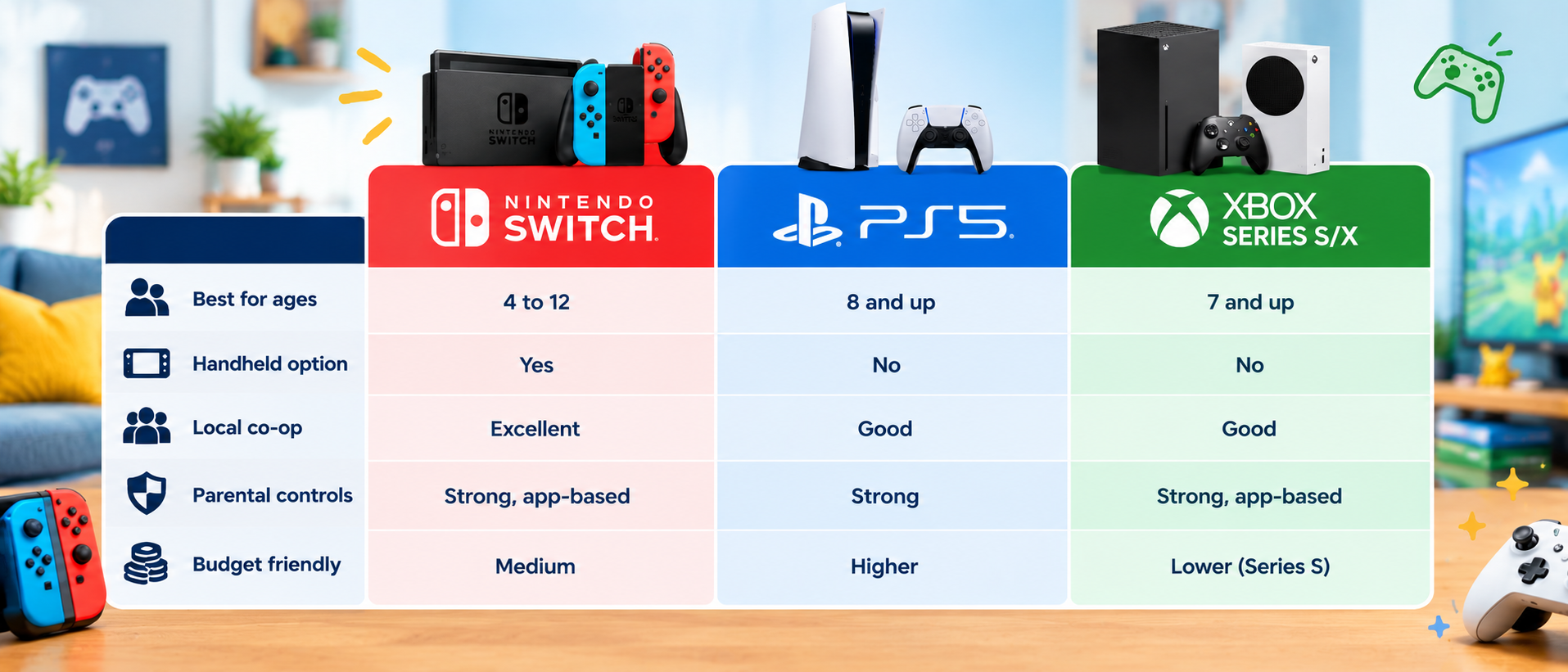
Rough guide, not gospel. Every family differs.
Parental Controls: Set Them Up on Day One
Don't skip this part. Seriously.All three platforms offer parental controls that let you do the following:
- Set daily play time limits.
- Block or limit online communication.
- Restrict games by age rating.
- Require approval for purchases.
PlayStation and Xbox both let you create a child account tied to your own. Do this before the kid ever touches the console. Fixing it afterward is a pain, and a certain eight-year-old I know already had a friend list full of strangers before his dad noticed.
One more tip: talk to your kids about why the rules exist. They push back less when they understand it isn't just you being annoying. Mostly.
Planning the Perfect Family Game Night
Now the fun part. A console is only worth it if you actually use it, and getting everyone around the screen takes a bit of planning. Family game night games should be easy to learn, quick to play, and forgiving when someone's terrible (usually Dad).Family Game Night Games That Actually Work
Here are some tried and tested ones.
Mario Kart 8 Deluxe (Switch): Up to four players locally. Kids can turn on driving assist so they don't constantly crash into walls, which means the five-year-old can genuinely compete. Chaos, laughter, blue shells. Someone will cry. That's tradition.
Super Mario Party Jamboree (Switch): Mini-games, board play, and a lot of shouting. Perfect for mixed ages because luck matters as much as skill.
Overcooked 2 (Switch, PlayStation, Xbox): You run a chaotic kitchen together. It tests communication, and I'll be honest, it has ended a few friendships. But in a family? Hilarious. Maybe don't play it right after a stressful day.
Minecraft (all platforms): Split-screen or online with family. Build a house, dig a hole, fight the occasional zombie. Endless.
Just Dance: Cheap, silly, and gets everyone off the couch. Grandparents love it, strangely.
Super Mario Bros. Wonder (Switch): Up to four players can run through levels together. Lovely design, and it's gentle enough for younger kids.
Tips for Smooth Game Nights
- Pick a time: Friday evenings work for many households. Consistency builds anticipation.
- Rotate who chooses: Otherwise the loudest child always wins.
- Snacks matter: Seriously. Popcorn. Sticky controllers are a small price.
- Keep it short: An hour is often plenty before tempers fray.
- Let the kids win sometimes: Or don't, and enjoy the drama. Your call.
Co-op Games vs Competitive Games
Here's something I noticed. Competitive games are great when kids are close in age and skill. When they're not, one child tends to get crushed, and then you've got tears and a slammed controller.Co-op games fix that. Instead of racing each other, everyone works toward the same goal. Kirby and the Forgotten Land, Sackboy, and Lego titles are great examples. Older siblings can help younger ones without anyone feeling patronized. The mood stays friendly, and you end up laughing instead of arguing.
So if your household is a bit competitive (aren't they all?), mix both types. A co-op game to start, a friendly race to finish.
Budget Gaming: How to Not Go Broke
Gaming can get expensive. Here's how to keep costs down without making your kids feel shortchanged.- Buy used or discounted: Retail stores and online sales regularly cut prices, especially around holidays. Check for bundles that include a game and extra controller.
- Consider the Xbox Series S or a standard Switch: Both give you plenty of entertainment for a lower entry cost.
- Look at subscriptions carefully: Game Pass or similar services can save money if your family plays several different titles. If you only play one game, buying it outright is smarter.
- Wait on accessories: You don't need the fancy charging dock on day one. Really.
- Borrow, trade, share: Friends, libraries (some do lend games), and cousins like Priya all help.
Which Console Should You Actually Buy?
Okay, decision time. I'll commit.- Kids under 8, family play first: Nintendo Switch. No contest.
- Mixed ages with older siblings: PlayStation 5 or a Switch plus a second device.
- Tight budget, big game variety: Xbox Series S with Game Pass.
- Frequent travel or long car rides: Switch, because handheld mode is a lifesaver.
Final Thoughts
Choosing the best game console for kids isn't really about specs. It's about what your family will actually enjoy together. A console that sits unused is a very expensive paperweight, while one that brings everyone to the couch on a rainy Sunday is worth every penny.Nintendo Switch is the safest bet for younger children and family-friendly gaming systems in general. PlayStation offers stunning visuals and strong parental tools. Xbox gives you value through Game Pass. Whatever you choose, set up parental controls first, pick a few co-op games, and make game night a real habit instead of a once-a-year idea. And if you want to save on the console itself, shop refurbished gaming consoles at Back Market.
And remember, you don't have to be good at it. Nobody expects that. Just show up, pick up a controller, and let your kids beat you at Mario Kart. They'll remember that far longer than the score.
Start your family game night today! 🎮
Explore the world of fashion, beauty, lifestyle, and entertainment with Funandflip – your daily dose of trendy tips, style inspiration, and everything fun, fabulous, and fresh in one place!
Read Our More Blogs:
Gaming TV Vs Regular TV: Does The Difference Really Matter?
Beauty Products Worth Buying During Online Sale Events
Best Time To Take Whey Protein: Before Or After Workout?
Frequently Asked Questions
1. What is the best game console for kids under 8?
For most families, the Nintendo Switch is the best choice for younger children. It has simple controls, colorful and gentle games, built-in local multiplayer, and a portable handheld mode. Its parental controls app is also easy to use, which helps if you're new to gaming consoles for beginners.
2. Are parental controls reliable on gaming consoles?
Yes, for the most part. Nintendo, PlayStation, and Xbox all let you limit play time, restrict age-rated content, manage online communication, and block unwanted purchases. No system is perfect, and kids can be surprisingly clever, so combine the settings with open conversations about safe play.
3. Which console is best for a budget family?
The Xbox Series S and the standard Nintendo Switch are usually the most affordable routes into family gaming. The Series S pairs nicely with Game Pass, which can lower the cost per game. The Switch holds its value and has many reasonably priced family games. Check current prices, since deals change often.